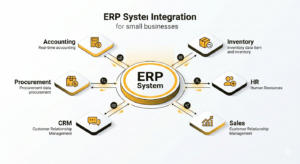
ERP systems unify all major business functions into a single connected platform
Enterprise Resource Planning (ERP) systems are no longer exclusive to large corporations. In today’s competitive digital economy, small businesses are rapidly adopting ERP solutions to streamline operations, reduce manual work, and improve decision-making. An ERP system integrates core business functions—such as accounting, inventory management, human resources, sales, and customer relationship management—into a single unified platform.
For small businesses, this integration is especially valuable because it eliminates fragmented tools and disconnected workflows. Instead of juggling spreadsheets, standalone accounting software, and manual tracking systems, business owners can manage everything from one dashboard. This leads to improved efficiency, better data accuracy, and stronger financial control.
Modern ERP platforms such as SAP, Oracle, Microsoft with its Dynamics 365 suite, and cloud-first solutions like NetSuite have made it easier than ever for small and mid-sized businesses to adopt scalable ERP systems without massive infrastructure costs.
The demand for ERP adoption among small businesses is driven by increasing competition, rising customer expectations, and the need for real-time business insights. However, implementing an ERP system is not just a technical upgrade—it is a strategic transformation that affects processes, people, and decision-making across the organization.
This guide will walk through everything small business owners need to know about ERP systems, including how they work, why they matter, and how to choose and implement the right solution. In the first half, we will focus on foundational concepts, benefits, and selection criteria to build a strong understanding before moving into implementation strategies in the second half.
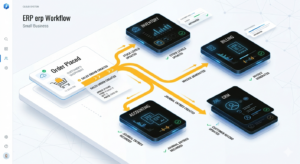
ERP automation ensures every business action updates all systems in real time
An ERP (Enterprise Resource Planning) system is a centralized software platform designed to manage and integrate multiple business processes into a single system. For small businesses, this means replacing multiple disconnected tools with one unified system that provides real-time visibility into operations.
At its core, an ERP system collects data from different departments and stores it in a centralized database. This allows every function—sales, finance, inventory, and HR—to access consistent and updated information. For example, when a sale is made, the ERP automatically updates inventory levels, generates an invoice, and records the financial transaction without manual intervention.
ERP systems typically include several interconnected modules, such as:
For small businesses, the biggest advantage is automation. Instead of manually entering data into multiple systems, ERP ensures that one action triggers updates across all relevant modules. This reduces human error and improves operational efficiency.
Cloud-based ERP solutions have become particularly popular because they require minimal upfront investment and can be accessed from anywhere. ERP solutions for small business are especially designed to scale with growing operational needs. Platforms like Microsoft Dynamics 365 offer scalable solutions that grow with the business.
Key working principles of ERP systems include:
For small businesses, this level of integration can significantly improve productivity and eliminate inefficiencies caused by fragmented systems. However, understanding how ERP works is only the first step; recognizing its benefits is what drives successful adoption.
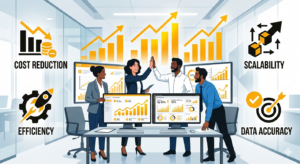
ERP systems drive efficiency, accuracy, and business growth for small companies
ERP systems provide a wide range of benefits that directly impact the efficiency, profitability, and scalability of small businesses. One of the most significant advantages is operational efficiency. By automating repetitive tasks such as invoicing, payroll, and inventory updates, businesses can save time and reduce administrative workload.
Another major benefit is improved data accuracy. Since all information is stored in a centralized system, the chances of duplication, inconsistencies, or manual entry errors are significantly reduced. This ensures that business decisions are based on reliable and up-to-date information.
Financial visibility is another critical advantage. ERP systems provide real-time insights into cash flow, expenses, revenue, and profitability. This helps small business owners make informed financial decisions and plan for future growth.
Some of the most important benefits include:
ERP systems also enhance collaboration between departments. For example, sales teams can instantly check inventory levels, while finance teams can track revenue in real time. This level of transparency improves communication and reduces operational delays.
Additionally, ERP systems support better supply chain management. Small businesses dealing with inventory or logistics can track stock levels, supplier performance, and order fulfillment more effectively.
Cloud ERP platforms such as SAP Business One and Microsoft Dynamics 365 Business Central are particularly valuable because they offer subscription-based pricing and flexible deployment options.
Despite these advantages, businesses must carefully evaluate their needs before selecting an ERP system. Choosing the wrong platform can lead to unnecessary complexity and cost overruns. The next section explores how small businesses can select the right ERP solution based on their goals and operational requirements.
Selecting the right ERP system is one of the most important decisions a small business can make. The choice directly impacts operational efficiency, scalability, and long-term growth. Since ERP systems vary widely in features, pricing, and complexity, businesses must evaluate their needs carefully before making an investment.
The first step in choosing an ERP system is identifying business requirements. Small businesses should analyze their current processes, pain points, and future goals. For example, a retail business may prioritize inventory management, while a service-based company may focus on CRM and billing.
Another critical factor is budget. ERP systems can range from affordable cloud-based subscriptions to expensive enterprise-grade implementations. Small businesses often benefit from SaaS-based ERP solutions that reduce upfront costs and offer flexible pricing models.
Key factors to consider when selecting an ERP system include:
Cloud-based ERP systems are generally preferred by small businesses due to lower infrastructure costs and easier maintenance. Solutions like Oracle NetSuite ERP and Microsoft Dynamics 365 offer strong scalability and integration capabilities.
It is also important to evaluate vendor support and training options. A well-supported ERP system ensures smoother onboarding and reduces implementation risks. Many providers offer tutorials, documentation, and customer support to help businesses transition effectively.
Common mistakes to avoid when selecting an ERP system include:
A structured selection process ensures that businesses choose an ERP system that aligns with their operational needs and long-term objectives. Once the right system is selected, the next phase involves planning and executing a successful implementation strategy, which will be covered in the second half of this guide.
Implementing an ERP system is a structured process that requires careful planning, coordination, and execution. Unlike simple software installations, ERP deployment impacts every department in the organization, making it essential to follow a phased approach. Small businesses often fail at implementation not because of technology limitations, but due to poor planning, lack of training, and unclear objectives.
The ERP implementation journey typically begins with planning and requirement mapping. At this stage, businesses define clear goals such as improving inventory accuracy, reducing financial reporting time, or automating order processing. Without clearly defined objectives, ERP projects can easily become expensive and underutilized.
A standard ERP implementation process includes:
Each phase must be executed carefully to avoid disruptions in daily operations. Small businesses should also assign an internal project manager to coordinate between departments and the ERP vendor.
One of the most critical stages is system configuration. During this phase, the ERP is customized to match business workflows, such as invoice formats, approval hierarchies, inventory rules, and reporting structures. Cloud ERP platforms like Microsoft Dynamics 365 Business Central and SAP Business One offer flexible configuration tools that reduce the need for heavy coding.
Successful implementation depends heavily on communication and change management. Employees must understand why the ERP system is being introduced and how it will improve their daily tasks. Resistance to change is one of the most common reasons ERP projects fail in small businesses.
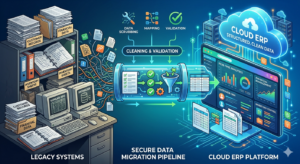
Secure and accurate data migration is the foundation of successful ERP implementation
Data migration is one of the most sensitive and technically challenging phases of ERP implementation. It involves transferring existing business data—such as customer records, financial data, supplier information, and inventory details—from legacy systems into the new ERP platform.
Poor data migration can lead to serious issues, including inaccurate reporting, duplicate records, and operational disruptions. Therefore, businesses must clean and validate data before migration. This includes removing outdated entries, correcting inconsistencies, and standardizing formats.
Key steps in data migration include:
After migration, system integration becomes essential. Most small businesses use multiple tools such as accounting software, CRM systems, e-commerce platforms, and payment gateways. The ERP must integrate seamlessly with these tools to ensure smooth data flow.
For example, integrating an ERP with an online store ensures that:
Modern ERP systems like Oracle NetSuite and Microsoft Dynamics 365 provide built-in APIs and connectors to simplify integration.
System configuration also includes defining workflows, user roles, and access permissions. This ensures that employees only access relevant data based on their responsibilities. For example, finance teams may have access to accounting modules, while sales teams focus on CRM and order management.
Proper configuration improves security, efficiency, and usability. However, over-customization should be avoided, as it can increase costs and complicate future upgrades.
Even the most advanced ERP system will fail if employees are not properly trained. Change management is a critical success factor in ERP implementation, especially for small businesses where employees often handle multiple responsibilities.
Training should begin before the system goes live. Employees need to understand not only how to use the software but also why the change is happening. This helps reduce resistance and increases adoption rates.
Effective ERP training strategies include:
Different departments require different training approaches. For example, accounting teams need in-depth training on financial modules, while warehouse staff need training on inventory tracking and order fulfillment.
Change management goes beyond training. It involves preparing the entire organization for a shift in processes and mindset. Leadership plays a crucial role here by communicating benefits clearly and consistently.
Common challenges in change management include:
To address these challenges, businesses should adopt a phased rollout approach. Instead of launching the entire ERP system at once, companies can implement modules gradually—starting with core functions like finance or inventory management.
Cloud ERP solutions such as SAP Business One and Oracle NetSuite ERP often provide guided onboarding programs and customer success support to simplify this transition. Businesses can also explore scalable solutions like ERP for small business to ensure smoother adoption.
Strong change management ensures higher user adoption, fewer operational disruptions, and long-term ERP success.
Once the ERP system goes live, the journey is not over. In fact, post-implementation optimization is where businesses start realizing the full value of their investment. Small businesses must continuously monitor system performance, user adoption, and process efficiency.
The first step after deployment is performance evaluation. This involves analyzing whether the ERP system is meeting its original objectives, such as improving reporting speed, reducing manual errors, or enhancing inventory control.
Key areas to monitor include:
Regular system audits help identify bottlenecks or inefficiencies. Businesses may also discover unused features that can further improve operations if properly configured.
Another important aspect is continuous improvement. ERP systems are designed to evolve with the business. As companies grow, they may need to add new modules, expand user access, or integrate additional tools.
Best practices for long-term ERP success include:
Small businesses should also maintain a strong relationship with their ERP vendor for ongoing support. Vendors often release new features, security updates, and performance improvements that can significantly enhance system capabilities.
Advanced ERP platforms like Microsoft Dynamics 365 Business Central and SAP Business One offer continuous cloud updates, ensuring businesses always operate on the latest version without manual upgrades. Organizations can also strengthen operational control using CRM systems and integrated HR management systems.
System performance evaluation and continuous optimization are also discussed in enterprise best practices resources such as ERP system fundamentals.
Ultimately, ERP success depends on continuous optimization, employee engagement, and strategic alignment with business goals. When implemented and managed correctly, an ERP system becomes a powerful foundation for scalability, efficiency, and long-term growth.
Implementing an ERP system in a small business is a transformative journey that goes far beyond software installation. It involves strategic planning, careful system selection, structured implementation, employee training, and continuous optimization.
From improving operational efficiency to enabling data-driven decision-making, ERP systems offer significant advantages for small businesses looking to scale in a competitive environment. However, success depends on choosing the right system and executing implementation with a clear roadmap.
With the right approach, ERP becomes not just a tool, but a central nervous system for the entire business—connecting people, processes, and data into one intelligent ecosystem.
An ERP system for small businesses is software that integrates core business functions like accounting, inventory, sales, HR, and CRM into one centralized platform to improve efficiency and decision-making.
Small businesses need ERP systems to reduce manual work, eliminate data errors, improve productivity, and gain real-time visibility into operations and finances.
An ERP system works by collecting and storing data from different departments in a single database, allowing all business functions to access and update information in real time.
Key benefits include automation of tasks, better financial control, improved reporting, enhanced collaboration, scalability, and increased operational efficiency.
Costs vary depending on the provider and features. Cloud-based ERP systems typically use subscription pricing, making them more affordable for small businesses compared to traditional on-premise systems.

A profitable business does not merely depend on a good product but is significantly liable...

The ERP manufacturing companies are evolving and expanding at a rapid pace, thereby increasing competition...

In a short span of time, customer relationship management software has enormously advanced and picked...

Every year, we see the rise of new technologies., With each rising technology, we see...

The emerging economies are powering global growth. The world has witnessed the rise of manufacturing...

India is the world’s largest home to small and large-scale industries and a central hub...
The outbreaks of the Covid-19 virus caused worldwide panics and delivered a consequential blow to...
When the Cloud ERP Covid-19 pandemic came upon. It ushered in radical uncertainty and caused...

